





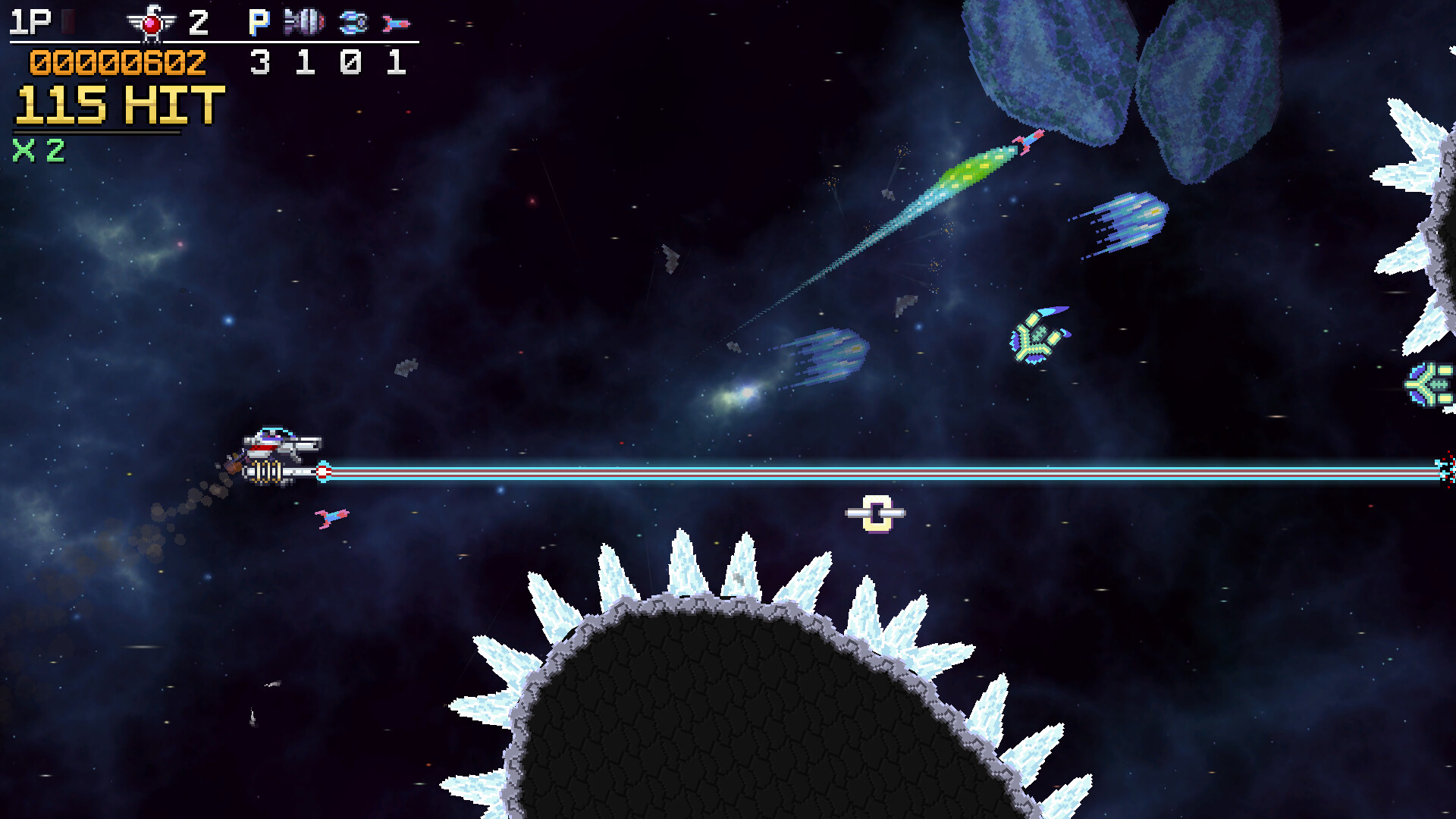
Alpha 2r2 is finally here! This patch brings a massive list of improvements and bug fixes to Cosmic Destroyer and some new Features!
I spent the weekend demoing Cosmic Destroyer at 2D Con, and the prep for the convention delayed the planned release until today. So much good feedback and new bug fixes to get into the release that I felt it was better to release all of these updates together. I apologize for any inconvenience if you were hoping to play Cosmic Destroyer\'s new update last weekend and experienced the old bugs!
Notable Features and Changes
New Ship - E.M.A.
[img src=\"https://cdn.cloudflare.steamstatic.com/steamcommunity/public/images/clans/45611288/a9eb83d3eabe740c62d93bdcea5bad2205142ba5.gif\"][/img]
The E.M.A. is an Electro-Magnetic Assault ship. It zaps everything in its way with a Plasma Link weapon that leaps like chain lightning! Its available immediately for players to try it out. It will no doubt need some re-balancing in the future - as part of a re-balance coming to all ships and enemies.
Auto Fire Functionality
The community asked for it, and it\'s here! Auto Fire is fully emulated based on old-school hardware techniques. This new fire mode can be configured to trigger at 60hz, 30hz or 15hz and allows the player to hold the button to fire wide shots while continuing to move quickly. Fire control for the focus shot has not been modified, so there are two fire buttons.
Players can also hold the Focus Shot button to move slowly while sustaining auto-fire wide shot
Grab and Throw Enemies and Objects
[img src=\"https://cdn.cloudflare.steamstatic.com/steamcommunity/public/images/clans/45611288/0ca02ddaedf8973a813039169c0b6333b2737471.gif\"][/img]
You can now grab and throw both small enemies and objects! These are some of the strongest attacks in the entire game by design, and will also be used for keys, batteries and other items to open up alternate paths in the future. (Also shown here, improved visibility of the fast-moving purple projectiles)
Additionally, held enemies provide a synergy ability when held.
Green Popcorn Drone & Purple Hangar Drone - Turrets attacks towards nearby enemies
[/*]Interceptor - Provides a Speed Bonus when held
[/*]Slug Larvae (Enemy Coming Soon) - Adds a bullet-slowing effect around the player when the player is firing a focus shot.
[/*]
New Starfield
[img src=\"https://cdn.cloudflare.steamstatic.com/steamcommunity/public/images/clans/45611288/67f2891564d4042b4161400b4d88a9a71153e7ee.gif\"][/img]
It\'s the little things that really add up. The starfield effect that was being used previously was a simple particle effect with positioning each frame, but this had many limitations and stylistically didn\'t really fit the pixel art aesthetic. It also had some really wonky artifacts when stages were twisting and turning.
The new starfield uses dynamically layered sprites which stretch while keeping each star\'s burst effect. The result is a much more consistent visual which is also much more performant and reliable.
Gameplay Improvements and Adjustments
Auto Fire functionality has been added. This feature emulates old-school hardware Auto Fire, which triggers the press action of the main shot at a configurable rate. You will find options for 15hz, 30hz, and 60hz Auto Fire in the Controls page of the Options menu along with button mapping for the Auto Fire (defaults to North Button (Y/Triangle) on gamepads and V on keyboard mapping).
[/*]Pacing of Stage 1 has been adjusted to be a bit more forgiving in the opening sections.
[list]First spread turret has been replaced with a normal turret
[/*]One ship hangar has been removed
[/*]Spinning Enemies which come from behind don\'t appear until later in the stage.
[/*]Laser Corvette in cave section has been removed as this was too near a wide turn, which resulted in wide laser sweep that was largely unavoidable
[/*]Breakable blocks have been added to the exit of the asteroid base to allow a player to pass through.
[/*]Overall speed has been tweaked across the stage
[/*]
Grazing projectile velocities have been improved, with dynamic behavior based on different projectile types allowing for some projectiles to inherit part of their original velocity (such as Purple shots from turrets).
[/*]Interceptor Enemy Ship provides a speed bonus to the player when held.
[/*]Popcorn Drone Enemy Ship provides a turreting ability when held which prioritizes enemies, then asteroids
[/*]Gamepad Deadzones have been improved to prevent bounce in UI menus. Specific deadzones have been set for both Xbox and Playstation controllers respectively.
[/*]Steam Input detection has been added. The game is not intended to be used with Steam Input for controllers other than Steam Controller. The game provides its own support for all major controllers. If a player has Steam Input enabled and is not using an actual Steam Controller, a popup is shown to recommend disabling Steam Input.
[/*]Ship Selection can now be done with a mouse click.
[/*]Adjusted Sable\'s dialogue at the start of Shipyard 7 stage to be a bit shorter and more clear.
[/*]Reactor Turbine no longer uses collision triggers to start its mini-cutscene, this is much more reliable and works for Co-Op even if players die just before the cutscene starts.
[/*]Stage Loading and general object instantiation performance has been improved across the board, this reduces lost frames while streaming stage assets during play as well.
[/*]A new developer tool to ensure all collision areas are pixel-aligned has been created, and colliders have been edited using this tool to improve consistency
[/*]Smoother rotations through stages. Spline Arc Parameterization performance has been improved by adding spatial partitioning, allowing the accuracy to be improved by over 5 times and spline lookup. As a baseline performance measure, stage 1 spline lookup has been improved from 3-4ms down to 0.02ms.
[/*]Visual Improvements
Starfield background has been improved to handle rotations much more accurately, allowing for more varied parallaxing effects.
[/*]Visual clarity of some tiles which are collidable have been improved to be more obvious to the player.
[/*]Visual clarity of the Crane Miniboss has been improved by changing palette from orange to a cooler pale green. Bullets are much more readable on this screen now.
[/*]Fast moving Purple Bullets now have an outline flash effect to enhance bullet readability. The darker purple was hard to track on some brown and blue backgrounds.
[/*]Score Summary screen has been improved to roll-up the enemies with a counter showing \"Destroyed / All\" for each enemy type.
[list]This includes new sprites for all enemies in the score summary screen to prevent stretching.
[/*]
Bug Fixes
Fixed a major collision issue where player\'s Option Drone can collide with some world objects such as doors which caused unexpected damage to player. No more \"I died for no reason\"!
[/*]Fixed a codec issue with Arcade Marquee / Attract Screen video not playing on Linux and older Windows computers
[/*]Fixed a performance issue with parallax spline background elements
[/*]Fixed an issue in Shipyard 7 stage where the next section of the stage would sometimes not load after the Vulcan Sentry enemy
[/*]Fixed an issue with navigation in the Controls section of the Options Menu
[/*]Fixed all dropdown menu items in the options menu so that the selected option is highlighted when opened or new items are selected with keyboard or joystick
[/*]Fixed an issue with UI elements remaining highlighted from the mouse after navigation by keyboard or joystick selects a different item
[/*]Collision issues in the Shipyard 7 stage have been corrected, including
[list]Assembly Line Area
[/*]Centipede Nest
[/*]
Fixed issue with Centipede legs sometimes stacking in the wrong order
[/*]Fixed a control issue with moving from the Tutorial stage to the Briefing and Ship Selection screens, where tutorial would start over instead of going to Stage 1
[/*]Fixed an issue with some popcorn enemies not initializing in Stage 1, causing them to remain stationary
[/*]Fixed an error which occurred when thrown asteroids collided with other asteroids due to having no Entity ID to register damage for score summary screen.
[/*]Fixed an issue where held enemies would take damage from bombs
[/*]Known Issues
Tutorial still has some issues with pacing and is currently being reworked into much quicker sections for the basic controls.
[/*]Enemies are simply wiped at the end of the stage which can look a bit jarring. The plan is to disable their collision and firing behaviors and provide transition behaviors for the stage end event (such as the Space Jet boss boosting off the screen if needed)
[/*]Many players have requested that gamepad triggers be mapped by default for firing, bombs and grabbing. This may require addition of a 3rd control mapping to retain functionality for having keyboard and gamepad mappings mapped simultaneously. Otherwise keyboard and gamepad mapping may need to be separated.
[/*]Control Mapping does not prevent the user from assigning the same button to multiple actions. It would be best to display a prompt to user that the control is already mapped and allow override/cancel of the remapping.
[/*]Audio mix levels change slightly in the main menu, which can cause a jump in audio levels when going to the options menu, which changes the audio mix abruptly.
[/*]
Minimum Setup
- OS: Ubuntu 12 or Higher
- Processor: Dual Core Processor or Higher
- Graphics: GPU Supporting Vulkan
- Storage: 400 MB available space
Recommended Setup
- OS: Ubuntu 20 or Higher
- Processor: Quad Core Processor or Higher
- Graphics: GPU Supporting Vulkan
- Storage: 400 MB available space

[ 6313 ]






















[ 5787 ]


[ 1933 ]


























[ 2282 ]




















Time left:
356104 days, 0 hours, 56 minutes

Time left:
356104 days, 0 hours, 56 minutes

Time left:
8 days, 8 hours, 56 minutes

Time left:
36 days, 8 hours, 56 minutes

Time left:
39 days, 8 hours, 56 minutes

Time left:
40 days, 8 hours, 56 minutes

Time left:
13 days, 18 hours, 56 minutes

Time left:
1 days, 2 hours, 56 minutes

Time left:
2 days, 2 hours, 56 minutes

Time left:
9 days, 2 hours, 56 minutes

Time left:
15 days, 2 hours, 56 minutes

Time left:
16 days, 2 hours, 56 minutes

Time left:
21 days, 2 hours, 56 minutes

Time left:
27 days, 2 hours, 56 minutes


