




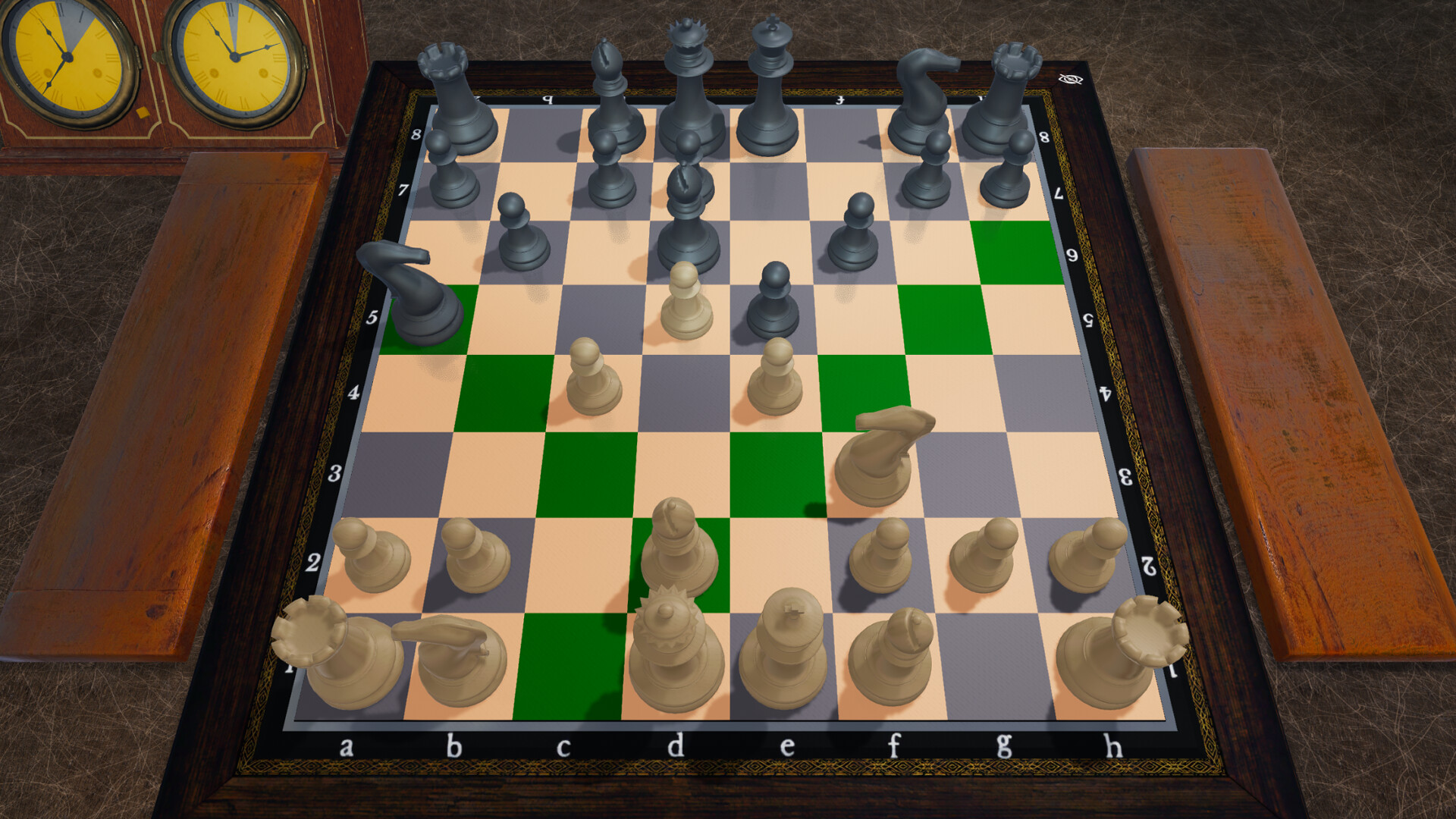
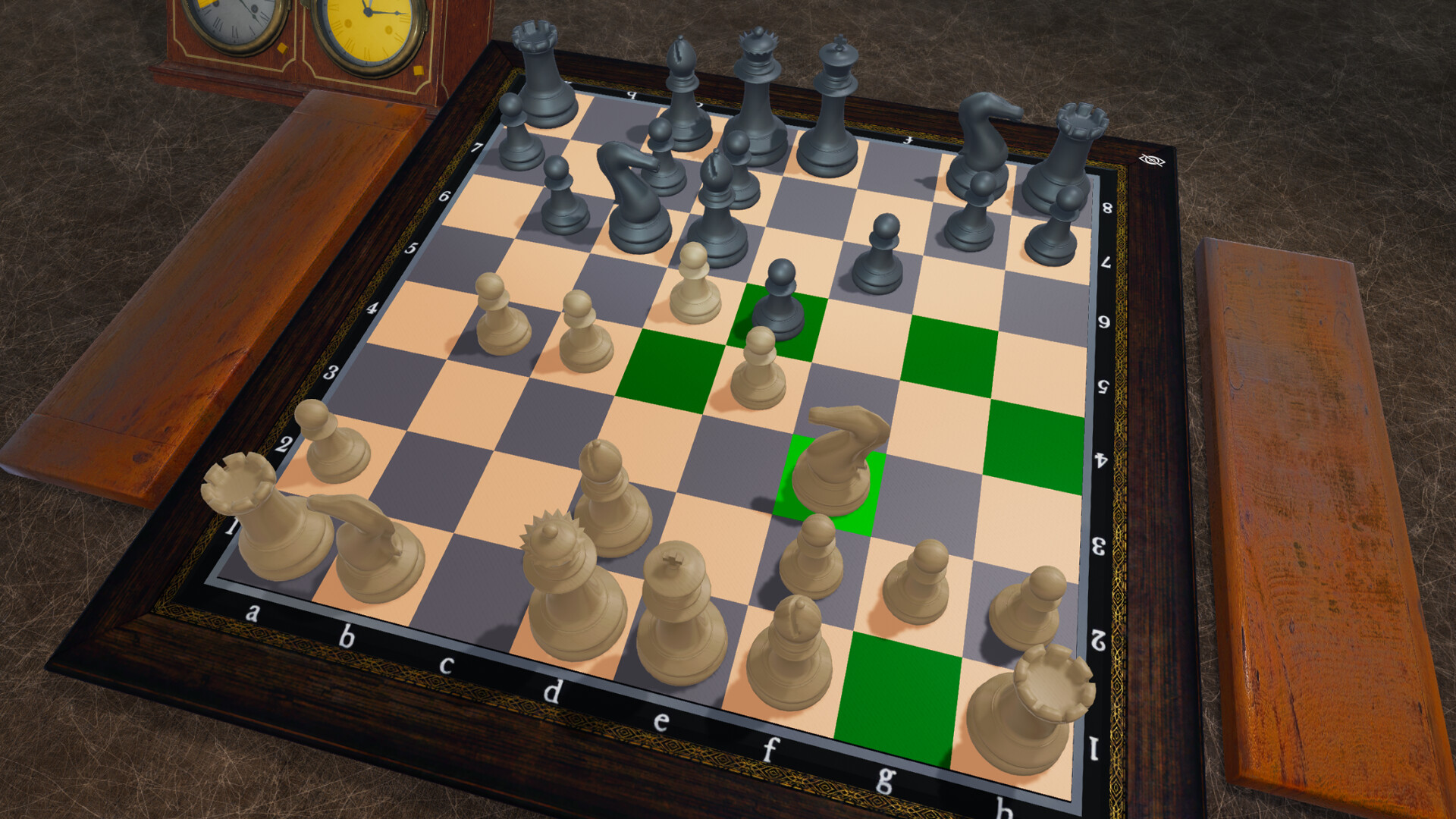
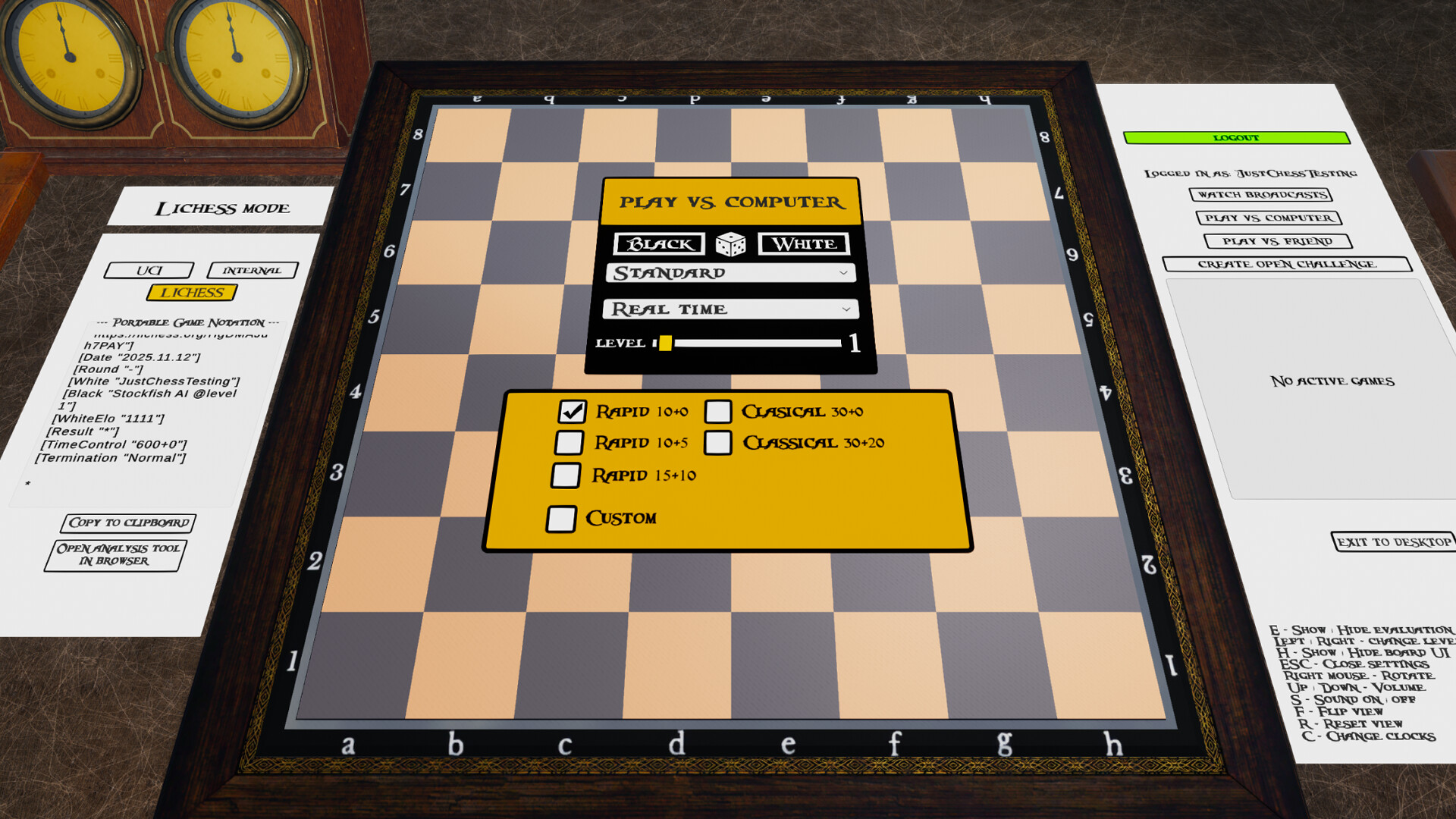
Enjoy a deep chess experience – solo or online – with Just Chess!
Whether you're a beginner or a seasoned player, Just Chess has everything you need. Sharpen your skills against a smart AI in a modern 3D environment, test your tactical vision with over four million chess puzzles, or challenge the world with comprehensive Lichess integration.
Key Features:
Built-in Chess Engine – Play offline instantly using the game's internal chess engine, no setup required.
UCI Engine Support – Take your game to the next level by connecting any external chess engine that supports the UCI protocol, such as Stockfish. Play against opponents at – and even beyond – grandmaster strength.
Engine vs Engine (EvE) – Curious to see which engine is stronger? Set up a match between two UCI chess engines of your choice and watch the battle unfold. Includes configuration options for engine threads and hash size.
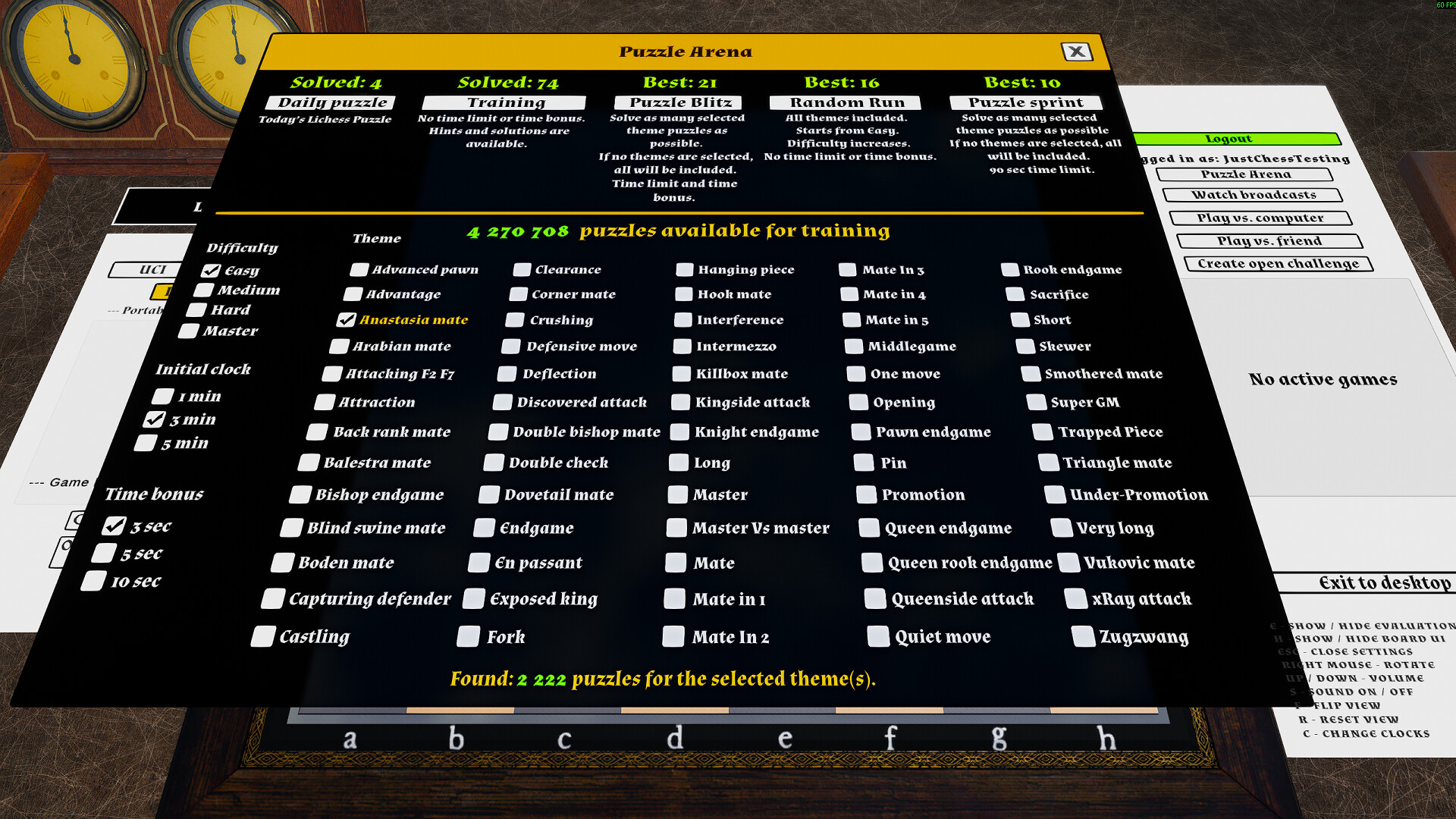
Puzzle Arena – Test your skills and improve your tactical awareness with a massive database of over four million puzzles from Lichess. Try different modes like the fast-paced Puzzle Blitz and the endurance-testing Puzzle Run.
Lichess Integration – Log in to your Lichess account directly from the game!
Challenge friends or millions of other players online.
Play against Lichess's own Stockfish AI at various difficulty levels.
Continue your ongoing correspondence or real-time games.
All online games are seamlessly synchronized with your Lichess account.
Spectate Live Tournaments – Follow top-level chess events in real-time with the new Lichess Broadcasts integration. Watch grandmaster games unfold live, directly within the game's immersive 3D environment.
3D Chessboard – With an adjustable viewing angle.
Flip & Reset View – Use F to flip the board and R to reset it to your playing side.
Chess Clocks & Time Controls – Play timed games with popular formats like Bullet (1+0), Blitz (5+3), Rapid (10+5), and Classical (30+0, 90/40). Time controls under 10 minutes are supported with both the built-in and UCI chess engines. Untimed mode is also available.
2D and 3D Chess Clocks – Switch between practical 2D and immersive 3D clock views using the C key. 3D clocks show remaining time as a circular diagram.
Adjustable Move Speed – Customize how fast the built-in or UCI chess engine plays its moves for a more relaxed or time-pressured experience. Combine with difficulty settings for a personalized challenge.
Easy to Play – Simple controls and an intuitive interface.
Adaptive AI Strength – Both the built-in and UCI chess engines can automatically adjust their strength based on your wins and losses, ensuring a balanced challenge.
PGN Export and Analysis – The game allows you to copy the chess game in PGN format to the clipboard and analyze it on online chess analysis websites. Online analysis may require an account with the analysis service provider.
Note: External chess engines must be downloaded separately. Please use only trusted sources. The developer is not responsible for third-party software.
🕹️ Partial Controller Support
🎮 Full Controller Support
Hello everyone!
[p align=\"start\"]As a solo developer, I am thrilled to announce that Just Chess is now officially available for Linux![/p][p align=\"start\"]I have released a native Linux build to ensure the smoothest possible experience. I have personally tested the game on the latest Ubuntu 24.04.3 LTS and haven\'t encountered any issues.[/p][p align=\"start\"]A note regarding Steam Deck:\nSince this is a native Linux build, it is very likely to improve performance and compatibility on the Steam Deck compared to the Windows version. However, as I don\'t own a Steam Deck myself, I haven\'t been able to verify this personally.[/p][p align=\"start\"]If you do play on a Steam Deck or a different Linux distribution, I would love to hear how it runs.[/p][p align=\"start\"]Happy gaming![/p]I have some promising news for those of you who play on Linux. While official support isn\'t ready just yet, I wanted to share the results of some recent experiments.
[p align=\"start\"]I spent some time this week creating and testing a native Linux build of Just Chess, running it on a live USB version of Ubuntu. During this preliminary test, I\'m happy to report that everything appeared to work flawlessly.[/p]Test System Specs:
OS: Ubuntu (Live USB)
[/*]CPU: AMD Ryzen 7 5800X3D
[/*]GPU: AMD Radeon RX 7900 XTX
[/*]
UCI Engine Support: I was able to successfully link a native Linux version of Stockfish and run a full engine-vs-engine game without any issues.
[/*]Lichess Integration: The Lichess authorization flow and the Puzzle Arena all functioned as expected.
[/*]Internal AI: The built-in AI opponent was also fully operational.
[/*]
This hotfix fixes an issue where Lichess login and logout were not working correctly.
A new update is now live, addressing some feedback and improving the Puzzle Arena experience.
Clock: The clock should now pause the moment you make a successful move. It remains paused during the opponent\'s entire move animation (or while the next puzzle loads) and only resumes when it is your turn to act again.
[/*]High Score System Overhauled:
[list]High scores are now tracked separately for each difficulty setting in applicable modes.
[/*]For Blitz Mode, records are also unique to each combination of time control and bonus settings.
[/*]Note: This creates a much fairer leaderboard, but it means all previous high scores have been reset. A fresh challenge awaits!
[/*]Important: Please be aware that, pressing the \"Reset all settings\" button in the options menu will also clear all of your saved Puzzle Arena high scores.
[/*]
\"Ghost Piece\" Bug Fixed: A visual glitch where pieces from a previous puzzle (often after castling) could remain on the board, causing pieces to overlap. This should now be fixed.
[/*]\"View on Lichess\" Link Corrected: The \'View on Lichess\' button for puzzles now links to the interactive puzzle page on Lichess, rather than just the source game.
[/*][p align=\"start\"]Hello Chess Fans,[/p][p align=\"start\"]I\'m incredibly excited to announce the biggest free content update for Just Chess yet! This update introduces a feature designed to help you sharpen your tactical vision and have a ton of fun doing it: the Puzzle Arena.[/p][p align=\"start\"]At the heart of this update is a massive, integrated database of over four million chess puzzles[/p]
sourced directly from Lichess.org . Whether you have five minutes or an hour, there\'s a new way to challenge yourself. The new Puzzle Arena is available as its own button within the Lichess game mode.
[p align=\"start\"][/p]Welcome to the Puzzle Arena
[p align=\"start\"]The Puzzle Arena is your new home for tactical training. It features several game modes, each offering a unique challenge:[/p]Puzzle Blitz: Inspired by Lichess\'s \'Puzzle Storm\', this is a fast-paced race against the clock. Start with a set amount of time and solve as many puzzles as you can. Correct answers add a small time bonus, and chaining them together builds a combo for even more points!
[/*]Puzzle Run: A true test of consistency and accuracy. You start with easy puzzles, and the difficulty increases with every correct solution. How long can you keep your streak going? One mistake, and your run is over.
[/*]Puzzle Sprint: Focus your training! Solve as many puzzles of a chosen theme as you can within a tight 90-second time limit. If no theme is selected, it will draw from all available puzzles. It\'s the perfect way to drill specific tactical patterns.
[/*]Training: Your personal tactics gym. Set your own rules by choosing the difficulty rating and up to three specific themes you want to practice. It\'s a relaxed, untimed mode designed for focused learning. If no theme is selected, it will draw from all available puzzles.
[/*]Daily Puzzle: A fresh tactical challenge from Lichess, delivered every day directly into the game.
[/*]
Other Fixes & Improvements
[p align=\"start\"]This update isn\'t just about puzzles. It also includes several under-the-hood improvements to make the game more stable and enjoyable:[/p]Fixed several race conditions related to piece animations and board clearing, which could occasionally cause visual glitches or errors between moves. The transitions between actions are now much more robust.
[/*]Improved UI consistency across different game modes and menus.
[/*]Refined text and descriptions for better clarity on game mode rules.
[/*]General stability and performance tweaks.
[/*]
What\'s Next?
[p align=\"start\"]The Puzzle Arena is a huge new playground, and I can\'t wait for you to jump in and test your tactical skills. Please share your feedback and any suggestions on the Steam forums. Your input is invaluable as I continue to develop and improve the game.[/p]**Please note:** The puzzles are designed to follow a single, pre-determined solution. This means you may occasionally find a valid move (like promoting to a Rook for mate) that the system marks as incorrect because it doesn\'t match the specific solution path. This is a known aspect of the puzzle set
Additionally, all puzzles are run from a local database included with the game. Your puzzle-solving activity within Just Chess is completely separate from your Lichess account and will not affect your official Lichess puzzle rating or statistics.
[p align=\"start\"]Thank you for your continued support, and happy puzzling![/p]Hello everyone!
[p align=\"start\"]I wanted to share a quick update on what Ive been working on lately. I am currently in the process of developing chess puzzles to bring more variety and challenge to the game.[/p][p align=\"start\"]Puzzles are a fantastic way to sharpen your tactical vision and offer a different way to engage with the game, whether you\'re looking to improve your skills or just solve some quick chess brainteasers.[/p][p align=\"start\"]Thank you for your continued support![/p]\n
The replay of finished broadcast games should now correctly use the games timestamps, as long as sufficient time control information is available in the broadcast and Quick replay is not enabled. Clocks should also display the correct times when stepping forward or backward through the moves.
[/*]A bug in the Internal chess engine has also been fixed. At higher difficulty levels, the calculation depth was too high, which could make the game appear frozen.
[/*]
Hello everyone,
[p align=\"start\"]I am happy to announce a significant update to the game! This update brings Engine vs Engine (EvE) functionality for the UCI mode, along with a visual refresh and numerous under-the-hood improvements.[/p][p align=\"start\"]New Feature: Engine vs Engine (EvE)\nYou can now pit two UCI chess engines against each other and watch them battle it out![/p]Settings: I have added UI controls to adjust the Threads and Hash table size per engine.
[/*]Recommendation: Based on my testing, I recommend setting 1 thread per engine. This provides excellent performance without putting excessive load on your CPU. Regarding Hash size, there are limits in place, but I recommend keeping this setting reasonable as well.
[/*]Engine Strength: Please note that some UCI engines (for example, Lc0) do not support a \"Skill Level\" setting. If the game detects that an engine does not support this, that engine will play at 100% full strength, and the difficulty slider will not affect it.
[/*]
Difficulty Slider: The engine skill level slider has been moved from the bottom of the chessboard to the Game Setup UI for each \"Play vs Computer\" mode. This cleans up the main view and unifies the UI experience.
[/*]High Score Removed: Along with the relocation of the slider, I have removed the \"Highest Score\" tracking and display. This feature was a remnant of the early development phase specifically for the internal engine, and I felt it had lost its relevance in the current state of the game with multiple engine options.
[/*]New Font: The game now uses a new font type that is much clearer and easier to read.
[/*]
Login: The Lichess login process has been reworked to be more reliable.
[/*]Broadcasts: The Broadcast listing has been improved and now fetches the maximum number of tournaments allowed by Lichess (100 tournaments).
[/*]Connectivity: I have improved the network logic to better detect connection drops. The game will now attempt to recover gracefully if the connection is restored.
[/*]
Hello Chess Fans!
[p align=\"start\"]I am working on a new update that brings technical improvements and streamlines the gameplay experience. Here is an overview of the upcoming changes:[/p][p align=\"start\"]Engine vs. Engine Mode\nSoon, you will be able to set two different UCI chess engines to play against each other. For example, you can watch how the traditional calculation powerhouse Stockfish plays against the neural network-based Lc0.[/p][p align=\"start\"]I am also adding UI controls for some UCI settings (such as Hash and Threads). The system will detect your hardware and automatically set safe maximum limits for these controls to ensure matches run smoothly.[/p][p align=\"start\"]Unified User Interface\nAs the game\'s features expand, it is time to tidy up the interface. The difficulty slider currently located at the bottom of the board will be removed from its current position.[/p][p align=\"start\"]Moving forward, difficulty levels and other settings will be configured centrally within the game setup panels (in both UCI and Internal modes). The old layout was an early development solution that no longer serves the expanded game well. This change will result in a cleaner look and consistent logic across all game modes.[/p][p align=\"start\"]These changes will be arriving in an update soon![/p]Hello chess fans!
[p align=\"start\"]I\'ve just released a small but useful update for the game. [/p][p align=\"start\"]Here are the highlights:[/p]Copy FEN: You can now copy the current board position to your clipboard as a FEN string.
[/*]Start from FEN: You can start a new game from any legal position by pasting a FEN code into the setup menu (\"From Position\").
[/*]
Internal AI: against the built-in engine.
[/*]UCI Engines: against external engines (like Stockfish).
[/*]Lichess: Works for both challenges against the Computer and against a Friend.
[/*]
I\'ve tested the update and haven\'t found any bugs, but please let me know if you run into any issues! As a solo developer, I truly appreciate your feedback and support.
[p align=\"start\"]Happy chess playing,\nThe Developer[/p]I am pleased to announce a significant new update that integrates the official Lichess Broadcasts feature directly into the game. You can now watch chess tournamentsboth live and recently concludedfrom around the world without ever leaving the game client. Please note that this feature currently supports standard chess tournaments.
[p align=\"start\"][/p]What is the Lichess Broadcasts Feature?
The Lichess Broadcasts feature streams games from tournaments directly to you. This allows you to follow the moves of grandmasters and top players in real-time, offering a fantastic way to learn, stay engaged with the competitive chess scene, and enjoy high-level games as they unfold.
[p align=\"start\"]Key Features Include:[/p]Tournament Browser: A dedicated browser for all live and recent official broadcasts available on Lichess.
[/*]Game Lists: Select any round from a tournament to see a complete list of all games played, including player names, ratings, and results.
[/*]Dedicated Spectator Mode: When you choose a game to watch, the UI enters a special \"TV Mode,\" complete with player names, ratings, and clocks that reflect the state of the live game.
[/*]Manual Game Scrubbing: While watching a broadcast, you can use your mouse wheel to manually scroll back and forth through the game, allowing you to analyze key moments at your own pace before resuming the live feed. When you\'re ready to continue watching, click Resume Live Feed button to exit manual scrolling and resume automatic playback. This will either jump to the live action or if you are watching a completed game it will continue the replay from the current move.
[/*]Intelligent Replay Pacing: The spectator mode features two distinct playback options for completed games to enhance your viewing experience.
[list]Realistic Timing: When timestamp data is available in the PGN, the replay replicates the actual pace of the game. You can experience the tension by seeing the real time each player spent thinking about their moves, from quick opening sequences to long, complex middlegame calculations.
[/*]Quick Replay: For a smoother, more condensed viewing experience, you can select the \'Quick Replay\' option, which is located in the game list. This mode uses a dynamic timing algorithm that simulates the natural rhythm of a chess game, with faster moves in the opening and more deliberate pacing during critical moments. Quick Replay is enabled by default.
[/*]Please note that some broadcasts may not provide the necessary time control data in their PGN files. In such cases, the game will automatically use the Quick Replay mode to ensure a consistent and enjoyable viewing experience.
[/*]
View on Lichess.org:
A dedicated \"View on Lichess\" button allows you to instantly open the game you are watching in your web browser. This gives you direct access to Lichess\'s own powerful analysis tools, game chat, and the full tournament context on their site.
[/*]How to Access the Feature:
[olist]From the main menu, click the \'Lichess\' button.
[/*]Click on \'Watch broadcasts\' to open the tournament browser.
[/*]Choose a tournament and then a round to view the list of games.
[/*]Select any game from the list to start watching.
[/*][/olist]A Note on Live Broadcasts
[p align=\"start\"]Please be aware that, due to the nature of live data streams, occasional interruptions or changes on the Lichess server side can cause playback to freeze. If you notice that a live game is no longer updating, there is a simple solution:[/p][p align=\"start\"]Simply press the \'Stop Watching\' button to return to the game list, and then re-select the same game. This will re-establish the connection and your viewing should resume from the latest live position.[/p]Additional Updates & Fixes
[p align=\"start\"]In addition to the new Broadcasts feature, this update brings several other enhancements:[/p]Improved Lichess Connection: The Lichess login and logout process has been reworked for better reliability.
[/*]Visual Enhancements: The game board background has been updated, and the pieces now feature a new reflection effect. This effect has been optimized to have a minimal impact on performance.
[/*]Broadcast UI: The Broadcast spectator background is more minimalist to better distinguish it from regular gameplay and to create a more focused, cinematic viewing experience.
[/*]General Fixes: Finally, this update includes numerous minor bug fixes and stability improvements throughout the game.
[/*]My goal with this feature is to bring the excitement of competitive chess directly into the game, creating a more complete experience for all chess enthusiasts.
The Lichess Broadcasts feature is an extensive addition to the game. While I have made every effort to test it thoroughly, given its complexity, some bugs or areas for improvement may still exist. If you encounter any issues, please report them in the Steam discussion forums. I will be monitoring the threads as regularly as possible to address your feedback.
[p align=\"start\"]Thank you for your continued support. I\'m already working on the next set of improvements and look forward to sharing more soon.[/p][p align=\"start\"]Best regards,[/p]Just Chess developer
Greetings, chess fans!
[p align=\"start\"]I am incredibly excited to unveil a major new feature I\'ve been working on, coming soon to Just Chess: Lichess Broadcasts Integration![/p][p align=\"start\"]What does this mean for you? Soon, you\'ll be able to follow the world of elite-level chess, right from inside the game! Whether you\'re a passionate tournament follower or looking to learn from the Grandmasters, this update will connect you to the international chess scene in a whole new way.[/p][p align=\"start\"]Here\'s what you can look forward to:[/p]Follow Lichess Tournaments Live: Watch Lichess tournaments in real-time, move by move.
[/*]Watch Your Favorite Players: See how Grandmasters and other players battle it out over the board in high-stakes matches.
[/*]Analyze on Lichess with a Single Click: Want to dive deeper? A dedicated button will let you instantly open the game you\'re watching directly on the Lichess website for access to its powerful analysis tools and community discussion.
[/*]Effortless Browsing: Easily navigate live and upcoming broadcasts through a new, intuitive menu directly from the main screen.
[/*]
The developer of Just Chess
[/*]
I\'ve just rolled out a small patch to address some key issues with the Lichess integration.
Fixed Time Controls: Fixed a critical bug where creating a custom or preset Lichess seek would always result in a 10+5 game, regardless of the user\'s selection. Challenges should now be created with the correct time controls you select.
[/*]Removed \"25+10\" Preset: Removed the \'25+10 Rapid\' preset option from the Lichess challenge panels.
[/*]Fixed Custom Game UI: Fixed UI layout issues where the custom game dialog could flow off-screen.
[/*]
[p align=\"start\"]Hello, chess fans![/p][p align=\"start\"]I\'m excited to release integration with Lichess.org![/p][p align=\"start\"][/p][p align=\"start\"]This update fundamentally transforms the game, connecting the familiar Just Chess experience with the Lichess chess platform.[/p][p align=\"start\"]What does this mean for you?[/p][p align=\"start\"]You can now securely log in to your own Lichess account directly from within the game, opening the door to the world of online chess. For now, the integration supports Standard chess, allowing you to:[/p]
Challenge your friends or other players from around the globe to real-time matches.
[/*]Play against Lichess\'s famous Stockfish AI at various difficulty levels.
[/*]View and continue all your ongoing Lichess games. Whether it\'s a rapid game or a correspondence match that lasts for weeks, you can pick up right where you left off.
[/*]Receive and manage challenges from other Lichess players.
[/*]Lichess Board API supports games with a base time of 10 minutes or longer (such as Rapid, Classical, and Correspondence chess).
[/*]
Update Just Chess via Steam to the latest version.
[/*]Switch to the Lichess mode and press the new \"Login\" button.
[/*]Authorize the application on the browser page that opens.
[/*]You\'re all set! The main menu will now display your active Lichess games, and you can start creating new challenges.
[/*][/olist][p align=\"start\"]This has been a massive development effort, and I\'m proud to finally bring it to you.[/p]A Note on Pricing
[p align=\"start\"]This Lichess update marks a major milestone for Just Chess, and the value of the game has grown significantly. To support the game\'s continued development and expansion, I will be adjusting the price later this year to reflect its new, expanded feature set. [/p][p align=\"start\"]Thank you for your support![/p]The Just Chess Developer
[/*]Since the last update hasnt produced new bug reports, Ive started moving the development forward. The next big feature coming is Lichess integration.
At first, the integration will only allow playing against the Stockfish engine, but challenging human players is also planned and will definitely be included later on. The first version will support the standard game mode with basic functionality. The UI will allow you to create both untimed and timed games, and I aim to include the most common time controls. However, since the Lichess board API doesnt seem to support the very fastest games, the minimum time control will be 10 minutes and upwards.
Early playtests are already underway. I cant yet give an estimate for the release date, but so far things are progressing smoothly. Im also aiming to design the UI features in a way that feels at least somewhat familiar to those who already use Lichess.
Once the core features are in place, I will look into supporting other chess variants as well. Lichess has a very wide range of features, so I may not be able to implement absolutely everything but the goal is to add real value to the game with this integration.
Stay tuned, and thanks for playing!
Update contents:
New reset button in settings\nYou can now restore Just Chess settings to default with a single click. Reset clears data saved in PlayerPrefs, restores checkboxes and slider settings to defaults, and removes the UCI chess engine path. If you use a UCI chess engine, you will need to select it again using the Browse button. Note: Highscore will not be reset.\nThe reset button can be found at the very bottom of the Settings menu.\nWe recommend closing and reopening the game after using reset. This is not required, but some settings are reloaded when the game starts.
[/*]Autoplay feature disabled\nThe automatic play function that started when the player was idle has been completely disabled for now.
[/*]Previous fixes\nIf youve experienced issues such as the promotion panel not appearing when a pawn reaches the last rank, or the clocks not working correctly during pawn promotion, these have already been fixed in earlier updates. However, please report if you still encounter these problems in this version.
[/*]
Game files have been updated due to a reported bug. Some players have experienced missing promotion panel and chess clock not stopping during promotion moves. We havent been able to reproduce this issue in testing, so its likely caused by outdated files. This update doesnt add new features it simply ensures the latest file versions are in use.
This update includes:
TimeControl and Termination tags have been added to PGN exports. These are generated according to the PGN standard, based on the selected time control. Since this is a relatively complex feature, some bugs may still appear feel free to report anything odd you notice.
[/*]The graveyard animation for captured pieces has been tweaked for a more polished and visually pleasing look.
[/*]Minor bug fixes and small improvements.
[/*]If you try to drag a piece outside the board, it now smoothly snaps back to its original position after a small buffer zone.
[/*]
- \n
- Fixed an issue where the promotion panel could get stuck underneath graveyards during a promotion selection.\n
- The chess clock should now properly stop after a promotion move once a piece has been selected.\n
Hi everyone!
To be honest Im scared of bugs. But I dont see any obvious ones this time... so Im shipping it!
The latest Just Chess update includes a wide range of improvements and fixes aimed at making the experience smoother, clearer, and more enjoyable for all players whether you\'re just starting or playing at a high level.
Key Fixes and Improvements:
Time bonus is now correctly applied after move animations, regardless of whether you drag or click.
[/*]Improved piece animations: pieces especially knights now maintain the correct orientation.
[/*]Smoother dragging with threshold detection to prevent accidental micro-movements.
[/*]Chess clocks now properly start after using the Continue button.
[/*]
New Time Control Features:
Added a popular format: Rapid 25+10.
[/*]AI move animation speed now adapts based on the selected time control. Slower games feature more deliberate, immersive animations, while faster formats keep things snappy and responsive.
[/*]
AI & Gameplay Adjustments:
Okay, Ill admit it: I may have over-optimized the internal engine and it ended up being too strong for beginner players. The fix? We added a touch of randomness to its move selection at lower levels! Now, instead of always playing the perfect move, the engine sometimes makes more human-like choices especially around level 1000 and below. This makes the game feel more approachable and enjoyable for new players.
[/*]Improvements to thinking-phase AI handling.
[/*]
Demo Game Enhancements:
While the demo game (autoplay) is running, you can pause it simply by moving the mouse, and continue playing from that point yourself.
[/*]Demo game is now reliably interruptible and resume-ready.
[/*]FSM system rebuilt for better control and stability.
[/*]StopAI calls ensure the engine doesnt get stuck after interruptions.
[/*]
Save & Continue Improvements:
Time-controlled games now reload as untimed, allowing use of Undo/Redo.
[/*]Auto-restart now requires mouse movement, preventing accidental game starts when away.
[/*]
Small UI & Visual Tweaks:
Restart animation no longer plays if no moves have been made.
[/*]Added distinct events for button arrivals during restart animation.
[/*]Flip (F) key instruction added to the in-game help.
[/*]Multiple polish-level improvements to interface and movement visuals.
[/*]
Minimum Setup
- OS: Ubuntu 24.04 LTS
- Processor: 64-bit processorMemory: 6 GB RAM
- Memory: 6 GB RAM
- Graphics: Nvidia GTX 960 or AMD equivalent
- Storage: 3 GB available space
Recommended Setup
- OS: Ubuntu 24.04 LTS
- Processor: 64-bit processorMemory: 8 GB RAM
- Graphics: Nvidia GTX 1060 or AMD equivalentNetwork: Broadband Internet connection
- Storage: 3 GB available space
[ 6176 ]






























[ 5746 ]


[ 1265 ]


























[ 2018 ]


























[ 986 ]


























Time left:
356101 days, 1 hours, 37 minutes

Time left:
356101 days, 1 hours, 37 minutes

Time left:
5 days, 9 hours, 37 minutes

Time left:
33 days, 9 hours, 37 minutes

Time left:
36 days, 9 hours, 37 minutes

Time left:
37 days, 9 hours, 37 minutes

Time left:
10 days, 19 hours, 37 minutes

Time left:
6 days, 3 hours, 37 minutes

Time left:
12 days, 3 hours, 37 minutes

Time left:
13 days, 3 hours, 37 minutes

Time left:
18 days, 3 hours, 37 minutes

Time left:
20 days, 3 hours, 37 minutes

Time left:
24 days, 3 hours, 37 minutes

Time left:
3 days, 16 hours, 52 minutes

Time left:
8 days, 9 hours, 38 minutes

Time left:
10 days, 8 hours, 38 minutes

Time left:
15 days, 15 hours, 48 minutes


