





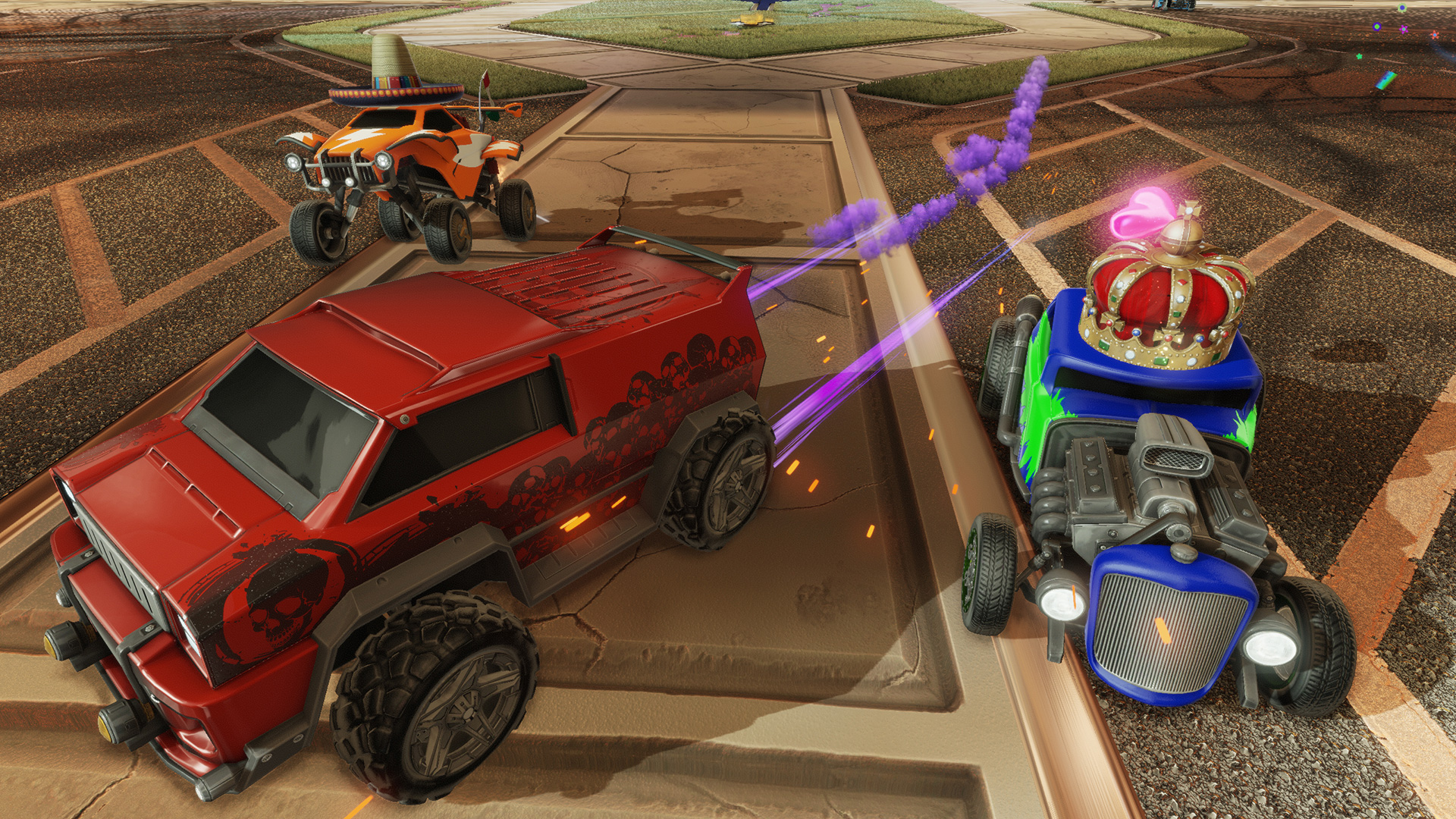

A futuristic Sports-Action game, Rocket League®, equips players with booster-rigged vehicles that can be crashed into balls for incredible goals or epic saves across multiple, highly-detailed arenas. Using an advanced physics system to simulate realistic interactions, Rocket League® relies on mass and momentum to give players a complete sense of intuitive control in this unbelievable, high-octane re-imagining of association football.
Awesome features include:
- All-new Season Mode that allows players to enjoy a full single-player experience
- Extensive Battle-Car customizations with more than 10 billion possible combinations
- Unlockable items and vehicles, stat tracking, leaderboards, and more
- Addictive 8-player online action with a variety of different team sizes and configurations
- Amazing 2-, 3-, and 4-player splitscreen mode that can be played locally or taken online against other splitscreen players
- Broadcast-quality replays that allow you to fast forward, rewind, or view the action from anywhere in the arena
- Competitive cross-platform gameplay with PlayStation®4 users
NOTE: Because of agreements with our online service provider, there are certain regions that are unable to connect to Rocket League®’s online multiplayer component. As a result, server access is restricted in China, Crimea, Cuba, Iran, North Korea, Sudan, and Syria. Apologies to our customers in those regions.
SteamOS and Mac Beta Versions
As of September 8, 2016, the SteamOS and Mac versions of Rocket League® were released to "Beta." SteamOS is the only "officially" supported Linux client, though other Linux platforms may be compatible. Likewise, the Mac version may or may not work on older systems with an integrated video solution and a dedicated GPU is highly recommended (Macs from 2013 or after should be okay). Mac system requirements are as follows:
- OS: MacOS X 10.8.5
- Processor: Intel Core i5 2.4 GHz
- Memory: 8 GB RAM
- Graphics: OpenGL 4.1 - ATI Radeon HD 5670, NVIDIA GeForce GT 640M, Intel HD Graphics 4000 or Iris Pro Graphics
Be sure and check ongoing patch notes for SteamOS and Mac beta updates going forward. Listed below are all known issues for both versions of the game as of September 8, 2016:
- The correct store page for DLC purchased through the Showroom doesn’t show up for Big Picture users. This is a Steam client-specific issue that Valve will be fixing in an upcoming patch
- There are occasional crashes when exiting from a match to the main menu
- The statues in Urban Central do not display correctly
- You may experience intermittent blurring issues
- (Mac Only) Xbox 360 controllers won’t work. You will need a third-party driver solution to use them
View the Rocket League® Terms of Use at www.rocketleaguegame.com/tos
[img src=\"https://cdn.cloudflare.steamstatic.com/steamcommunity/public/images/clans/9036925/e2fb25872e3303f243e560c93faa1cd06645fd96.jpg\"][/img]\nVersion: Rocket League v2.63\nPlatforms: Epic Games Store, Steam, PlayStation, Xbox, Nintendo\nScheduled Release: December 9, 2025 4 PM PT / December 10, 2025 12 AM UTC
THE HEADLINES
New Arena: Parc de Paris
[/*]Addition to 4v4 Arena Rotation
[/*]Quality of Life Update for Opening a Drop
[/*]Fast Free Play Update
[/*]
NEW CONTENT
[img src=\"https://us-west-2-epicgames.graphassets.com/cm84mjx3f0a0j08n79wol8l1l/cmirilaqf15lj06n27qwctx4s\"][/img]
[p align=\"start\"]New Arena: Parc de Paris[/p]The Parc de Paris Arena celebrates iconic French landmarks and sleek modern cityscapes.
[/*]
Weve addedMannfield (Quads) to the 4v4 Arena rotation.
[/*]
CHANGES AND UPDATES
[p align=\"start\"]Quality of Life Update for Opening a Drop[/p]Opening a Drop used to mean watching the full animation. Every. Single. Time. Pretty fun at first, not so fun when youre sitting on hundreds of them. To speed things up, were adding a new setting that lets you skip the animation and open Drops instantly. Less waiting, more items.
[list]This new setting is called SKIP DROP OPENING ANIMATION and is a toggle in the Settings menu.
[list]The Drop animation will only be skipped if this setting is toggled on (i.e., players cannot press a button to skip the animation).
[/*]The Open Drop confirmation popup has been removed to streamline the experience.
[/*]
Weve added UI improvements to make Private Match admin functionality toggleable and clearly visible throughout the match flow.
[/*]Global Match admins remain unaffected and retain admin status at all times.
[/*]Breakdown of the improvements:
[list]Added newMatch Admin Controls option toggle: Enabled / Disabled (Disabled by default)
[/*]Updated the Selected Mutators list to display aMatch Admin: ON indicator at the top.
[/*]Added atop-right Admin indicator when Match Admin is ON.
[/*]Admin indicator now appears during:
[list]Arena intro sequence
[/*]Countdown
[list]Indicator disappears once gameplay begins
[/*]
Added admin indicator to theMid-Game (Pause) Menu when Match Admin is ON.
Indicator hides again upon resuming gameplay.
[/*][/*]Added a top-rightadmin indicatoron the post-match screen showing whether Match Admin was active.
[/*]For match history and replays, aMatch Admin: On/Off field has been added to the Details panel.
The field is hidden when no admin data exists.
[/*][/*]Based on community feedback, we added a Yes (Stop Asking) option to the You are about to leave this match and enter Free Play. Continue? question. This allows players todisable the prompt entirely.
[/*]
BUG FIXES
[p align=\"start\"]General[/p]Fixed an issue where players with very large friends lists could experience stuttering during gameplay.
[/*]Fixed an issue where LAN hosts could not see their own typed chat messages.
[/*]Fixed an issue where Fast Free Play would fail to launch if the previously selected Free Play Arena was set to Random.
[/*]Fixed tail light brightness inconsistencies on the Porsche 911 Turbo,Breakout, and RAM 1500 RHO Car Bodies.
[/*]
Resolved an issue where VSync settings were not functioning correctly. Players should now experience reduced input latency when VSync is turned OFF.
[/*]
KNOWN ISSUES
[p align=\"start\"]For a complete list of known issues in Rocket League, check out our[u]Known Issues page[/u] .[/p]Minimum Setup
- Processor: 2.4+ GHz Quad coreMemory: 2 GB RAM
- Memory: 2 GB RAM
- Graphics: NVIDIA GTX 260 or ATI 4850Network: Broadband Internet connection
- Storage: 7 GB available space
Recommended Setup
- Processor: 2.5+ GHz Quad coreMemory: 4 GB RAM
- Graphics: NVIDIA GTX 660 or better. ATI 7950 or betterNetwork: Broadband Internet connection
- Storage: 7 GB available spaceAdditional Notes: Gamepad or Controller Recommended

[ 6376 ]












[ 5746 ]


[ 1265 ]









[ 1943 ]








[ 986 ]





Time left:
356100 days, 23 hours, 20 minutes

Time left:
356100 days, 23 hours, 20 minutes

Time left:
5 days, 7 hours, 20 minutes

Time left:
33 days, 7 hours, 20 minutes

Time left:
36 days, 7 hours, 20 minutes

Time left:
37 days, 7 hours, 20 minutes

Time left:
10 days, 17 hours, 20 minutes

Time left:
6 days, 1 hours, 20 minutes

Time left:
12 days, 1 hours, 20 minutes

Time left:
13 days, 1 hours, 20 minutes

Time left:
18 days, 1 hours, 20 minutes

Time left:
20 days, 1 hours, 20 minutes

Time left:
24 days, 1 hours, 20 minutes

Time left:
3 days, 14 hours, 35 minutes

Time left:
8 days, 7 hours, 21 minutes

Time left:
10 days, 6 hours, 21 minutes

Time left:
15 days, 13 hours, 31 minutes


